The AI recipe converter for Thermomix® owners

Any recipe.
Perfect Thermomix® steps.

Web links, cookbook photos, even grandma's handwriting — converted into precise time, temperature and speed settings for your TM31, TM5, TM6 or TM7. In seconds.

First conversion free No subscription needed TM31 · TM5 · TM6 · TM7
Try a sample:
thermoconvert.com/app

Convert Recipe

Paste a URL to generate Thermomix® steps

https://cooking-blog.com/creamy-mushroom-risotto
Text
URL
Photo
Generate Instructions

Analysing Recipe...

Converting for TM6 Model

TM64 Servings

🍚 Creamy Mushroom Risotto

1

Place 50 g parmesan in mixing bowl. Grate 10 sec/speed 10. Set aside.

10 sec
Speed 10
2

Add 2 shallots, 1 garlic clove and 30 g butter. Chop 3 sec/speed 5.

3 sec
Speed 5
3

Add 200 g mushrooms. Sauté 3 min/120°C/speed 1 (no measuring cup).

3 min
120°C
Speed 1
4

Add 300 g arborio rice and 100 g white wine. Cook 18 min/100°C/↻/speed 1.

18 min
100°C
Reverse · Speed 1

Like what you see?

What is ThermoConvert?

ThermoConvert is an AI-powered web application that converts any recipe into Thermomix®-specific cooking instructions. It supports TM31, TM5, TM6, and TM7 models.

Users can input recipes via web URLs, photos of cookbook pages, handwritten notes, or plain text. The AI analyses the recipe and generates step-by-step instructions with precise time, temperature, and speed settings tailored to the selected Thermomix® model.

The service includes automatic serving size adjustment (1-20 servings), dietary adaptations (Vegan, Gluten-Free, Dairy-Free, Keto, Sugar-Free), nutritional information, recipe images, and localised ingredient mapping for the UK, US, Australia, Canada, and New Zealand.

All converted recipes are saved to the cloud and accessible across devices. New users get their first conversion free (no credit card), then top up with a one-time pack from £2.99, or go unlimited for £2.99/month or £14.99/year.

Feed it anything

Four ways in. One perfect result.

"Beat 3 eggs, fold in flour, bake till golden…"
Handwriting

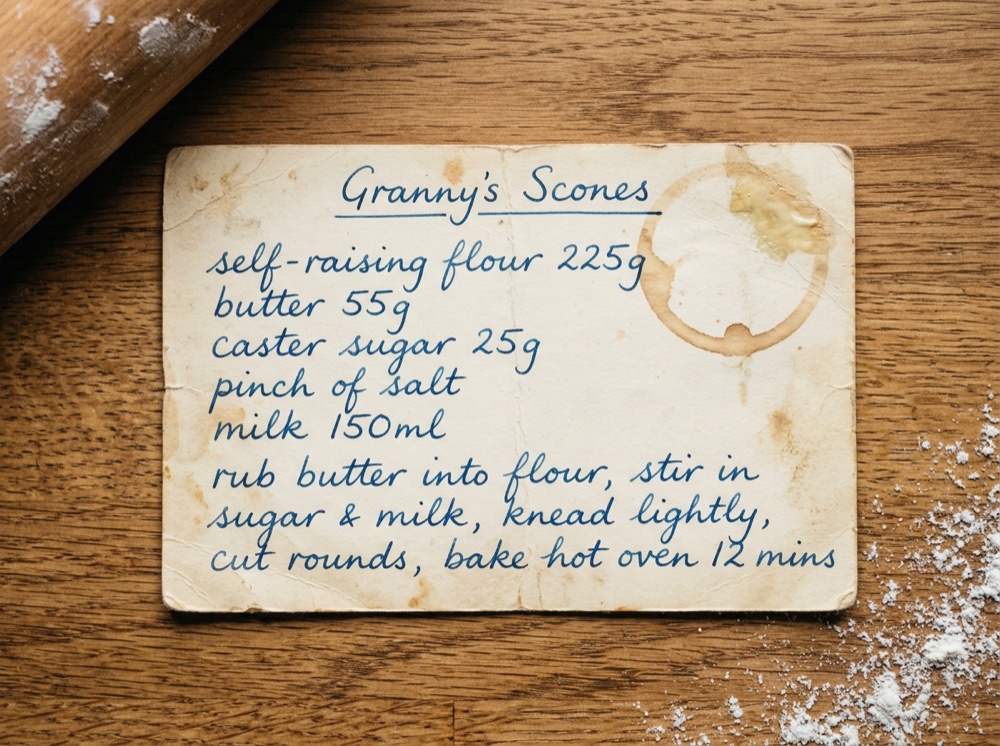
Photograph grandma's recipe cards. The AI deciphers handwriting and preserves family recipes forever.

bbcgoodfood.com/recipes/…
Web links

Paste any recipe URL — blogs, BBC Good Food, NYT Cooking — and it's extracted and converted instantly.

cookbook_page.jpg
Photos

Snap a cookbook page or a screenshot. Multiple photos per recipe supported — even paste from your clipboard.

"best chocolate cake recipe"
Search & text

No recipe yet? Just describe what you fancy and the AI finds one and converts it in a single step.

From raw idea to guided cooking in three steps

1.Input recipe

Paste a URL, upload a photo of a book page, or even scan a handwritten note.

2.AI analysis

The AI analyses the method, scales ingredients, and assigns the correct time, temp and speed for your exact model.

3.Start cooking

Follow step-by-step instructions in full-screen Cook Mode, with text-to-speech for messy hands.

Built for TM31, TM5, TM6 & TM7

Whether it's an old family favourite or a trending viral pasta, it works perfectly on your machine.

Update old favourites

A recipe that worked on your TM5 but fails on the TM7? It gets rebuilt to use modern machine modes, half speeds and higher temperatures.

Dietary adaptation

Need it Vegan, Gluten-Free, Keto or Sugar-Free? Ingredients are swapped intelligently and cooking times adjusted to match.

Localised ingredients

Zucchini becomes courgette, heavy cream becomes double cream. Set your region once — UK, US, AU, CA or NZ — and every recipe reads naturally.

Your digital cookbook

Every conversion is saved to the cloud, searchable, editable and organised into lists. Start on your laptop, cook from your phone.

Cook Mode

Full-screen steps with the settings front and centre, text-to-speech, and a screen that stays awake. No more scrolling with wet hands.

Nutrition & scaling

Serving sizes from 1 to 20 with auto-scaled quantities, plus per-serving calories, protein, carbs and fat on every recipe.

Cookidoo® gives you a library.
ThermoConvert gives you the whole internet.

They solve different problems. Most of our users keep both.

Cookidoo®ThermoConvert
Tested recipe library100,000+ official recipes
Converts recipes from any website
Converts cookbook photos & handwriting
Adapts recipes between models (TM31 → TM7)
Dietary adaptation of any recipe
Regional ingredient localisation

Cookidoo® is a registered trademark of Vorwerk. ThermoConvert is independent and not affiliated.

Prefer to convert by hand?

We published our free Thermomix® conversion chart: common task settings, the speed dial decoded, temperature guide and model differences. No sign-up needed.

Pay for what you cook

First conversion free. Then buy a pack once, or go unlimited for less than a third of Cookidoo®.

Free

£0

1 conversion, no card.

  • Your first conversion free
  • Photo, handwriting & URL
  • Recipes saved forever

Starter pack

£2.99once

25 conversions, ~12p each.

  • 25 conversions
  • No subscription
  • Credits never expire

Big pack Best value

£6.99once

100 conversions, ~7p each.

  • 100 conversions
  • Digitise the whole recipe box
  • Credits never expire
For regulars

Unlimited

£2.99/mo

or £14.99/year (save 58%)

  • Unlimited conversions
  • Recipe images & nutrition
  • Ingredient substitutions

Cookidoo® is £50/year. Every recipe you convert is yours to keep, even on the free plan.

Frequently asked questions

Everything you need to know about ThermoConvert

ThermoConvert supports all modern Thermomix® models: TM31, TM5, TM6, and TM7. When you convert a recipe, you select your specific model and we tailor the instructions accordingly. For example, TM6 and TM7 recipes can use half speeds (like Speed 3.5) and higher temperatures, while TM31 and TM5 recipes stick to whole speeds and the classic temperature range. This ensures every instruction is safe and achievable on your machine.
Our AI system is trained on thousands of Thermomix® recipes and cooking techniques. We follow Cookidoo's proven instruction format: ultra-concise steps with precise time, temperature, and speed settings. Whilst the AI is highly accurate, we always recommend reviewing the recipe before cooking, especially the first time. You can edit any recipe directly in the app if you'd like to make adjustments based on your preferences or experience.
Absolutely! Simply take a clear photo of the cookbook page using your phone, then upload it to ThermoConvert. Our AI system can read printed text and even decipher handwritten notes. This is perfect for digitising family recipes, old cookbooks, or recipe cards. Once converted, you'll have a searchable digital version that's backed up to the cloud and accessible from any device.
Every recipe you convert stays saved to your account permanently, free conversion included. You can view, edit, and cook from it anytime. To convert more recipes you just top up with a one-time pack (£2.99 for 25, £6.99 for 100), or go unlimited for £2.99/month or £14.99/year. There's no auto-charge and no subscription required: packs are a single payment and the credits never expire.
When converting a recipe, you can select dietary requirements like Vegan, Gluten-Free, Dairy-Free, Keto, or Sugar-Free. Our AI system intelligently substitutes ingredients (e.g., swapping butter for plant-based alternatives, or regular flour for almond flour) and adjusts cooking times if needed. The AI understands how these substitutions affect texture and cooking behaviour, so you get reliable results. You'll always see the adapted ingredient list clearly marked.
Yes! During conversion, you can set your desired serving size (1-20 servings), and we'll automatically scale all ingredient quantities proportionally. Our AI system also adjusts cooking times when appropriate - for example, larger batches may need slightly longer cooking. All nutritional information is recalculated per serving to match your chosen portion size.
Yes, all your recipes are automatically saved to cloud storage. Sign in with the same Google account on your phone, tablet, or computer, and your entire recipe library - including favourites, custom edits, and recipe lists - will be instantly available. You can start a recipe on your laptop and finish it on your phone in the kitchen.
Cook Mode is a full-screen, distraction-free interface designed for active cooking. It displays one step at a time in large, easy-to-read text with all settings (time, temp, speed) clearly visible. Use the next/previous buttons or swipe to navigate. We also include text-to-speech, so you can hear instructions hands-free while cooking. Cook Mode keeps your screen awake automatically, so you don't have to touch your device with messy hands.
Absolutely! Every recipe can be fully edited within the app. You can change the title, modify ingredient quantities, rewrite instructions, adjust settings, and even add or remove steps. This is perfect for personalising recipes based on your family's preferences or fixing any AI misinterpretations. All changes are saved automatically to the cloud.
If you convert recipes now and then, buy a pack: £2.99 gets you 25 conversions and £6.99 gets you 100, paid once, and the credits never expire. If you cook from new recipes most weeks, the Unlimited plan is better value at £2.99/month or £14.99/year (which works out cheaper than the big pack if you convert more than about 100 recipes a year). Unlimited also includes ingredient substitutions. You can start with a pack and switch to unlimited anytime.
When you convert a recipe, you can request an image match. Our AI system analyses your recipe title and ingredients, then creates an intelligent search query for Unsplash, one of the world's largest professional food photography libraries. The result is a stunning, high-quality image that matches your dish. This feature is available to all Pro subscribers and includes proper photographer attribution.
Yes, absolutely. We use Stripe, one of the world's most trusted payment processors (used by companies like Amazon, Google, and Shopify). We never see or store your credit card details - all payment data is handled exclusively by Stripe's PCI-compliant systems. Your payment information is encrypted and secure. You can manage your subscription, update payment methods, or cancel anytime through the secure Stripe Customer Portal.
Yes, you can cancel your subscription at any time with no penalties or fees. If you cancel, you'll retain full Pro access until the end of your current billing period (either your monthly or annual term). After that, your account will revert to the free tier, but you'll keep access to all previously converted recipes. You can resubscribe anytime to resume unlimited conversions.
No, ThermoConvert is an independent third-party application created by passionate Thermomix® users to help the community. We are not affiliated with, endorsed by, or connected to Vorwerk, Thermomix®, or Cookidoo. We simply love the Thermomix® platform and wanted to build a tool that makes it even more versatile and accessible for home cooks worldwide.
Whilst our AI system is highly accurate, it's not perfect. We recommend reviewing each recipe before cooking, especially the first time. If you spot an error, you can easily edit it directly in the app - just click the edit button on any recipe. You can modify ingredients, quantities, instructions, or settings. If you notice consistent issues with certain types of recipes, please let us know so we can improve our AI models.
Currently, recipes are private to your account for copyright and licensing reasons (since they may be based on copyrighted source material). However, your family members can each create their own free account and get a free conversion to try the service. If you're part of a household with multiple Thermomix® users, each person can maintain their own personalised recipe library with their preferences and favourites.
We give you a free conversion specifically so you can test ThermoConvert risk-free before paying anything. That's a genuine feel for the quality and accuracy of our conversions. Pack purchases and subscriptions are non-refundable once used, but subscriptions can be cancelled anytime to prevent future charges, and pack credits never expire. If you hit a technical issue that stops you using the service, contact us and we'll put it right.
Currently, ThermoConvert works best with English-language recipes. Our AI system can understand and convert recipes written in English, including regional variations (UK, US, Australian English). Support for additional languages (German, French, Spanish, Italian) is on our roadmap for future updates. If you're interested in using ThermoConvert in another language, let us know - user feedback helps us prioritise which languages to add first.
Recipe lists let you organise your converted recipes into custom collections, similar to Cookidoo. You can create unlimited lists (e.g., 'Quick Weeknight Dinners', 'Christmas Baking', 'Kids' Favourites') and add recipes to multiple lists. Each list can have a custom name and cover image. You can rename recipes, move them between lists, and delete lists without losing the recipes from your main library. It's perfect for meal planning and keeping your favourite recipes organised.
ThermoConvert automatically adapts ingredient names to match your region's terminology. Simply set your region (UK, US, Australia, Canada, or New Zealand) in your account settings, and all future recipe conversions will use your local ingredient names. For example, if you're in the UK, American recipes with 'zucchini' will automatically become 'courgette', 'heavy cream' becomes 'double cream', and 'cilantro' becomes 'coriander'. This works across 15-20+ common ingredients per region, making recipes feel natural and eliminating confusion about ingredient names.

Your next recipe is
already perfect.

Seven days, unlimited conversions, no credit card. Every recipe you convert is yours to keep — even if you never subscribe.